This time I connected the Lifepo4 battery Huawei ESM-48100B1 48V to the Huawei ETP4860-B1A2 with the SMU11B monitoring module and configured it.
To communicate between the battery and the monitoring module, only two CAN bus wires are required.
On the battery side, for the COM IN connector, crimp only the following to the RJ45 connector:
7 – white and brown (CANH / CAN+)
8 – brown (CANL / CAN-)
The battery should come with a 120 Ω resistor (a plug); connect it to the COM OUT port. If there’s no 120 Ω load at the end of the line, the signal is reflected back down the cable, which can cause communication with the battery to be lost. My cable is half a meter long, so it’s rarely necessary. However, if the cable is long or there are multiple batteries, it should be connected to the COM OUT port only on the last battery. If there are multiple batteries in parallel, they should be connected together with a regular Ethernet patch cord. The maximum number of parallel connections is CAN: 32; RS485: 16.
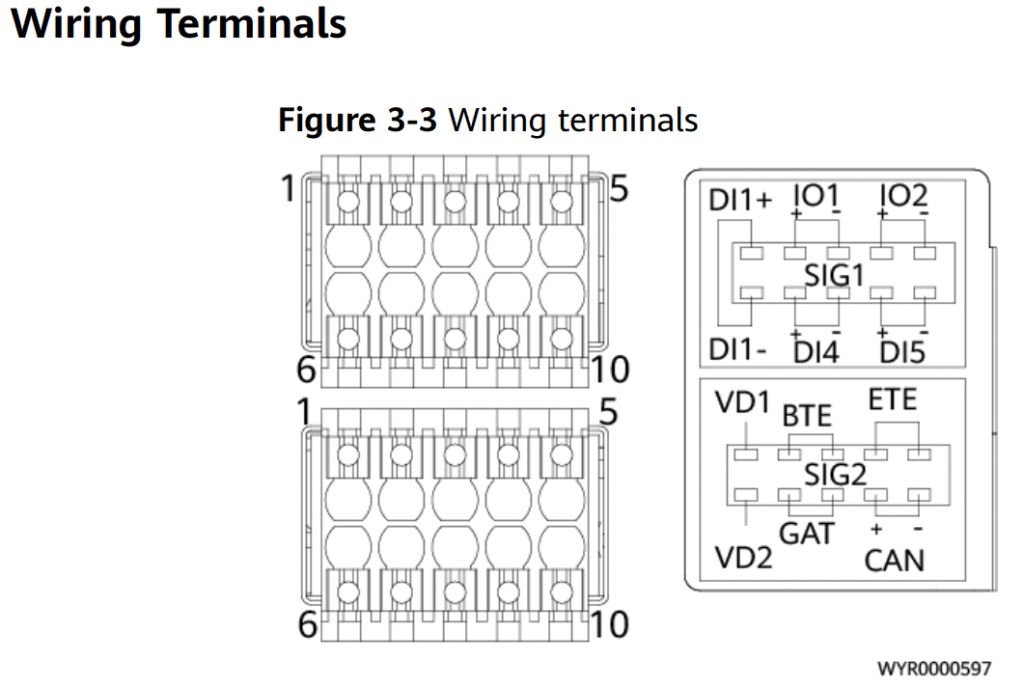
Connect CAN 9+ and CAN 10- to the SIG2 connector on the SMU11B side. Reboot if necessary. A new section for configuring the LifePo4 battery should appear in the SMU11B web interface (Monitoring – Digital Power – Lithium Battery Group ixnfo.com). The old settings for lead-acid batteries will also remain, but they won’t be used.

Depending on the SMU11B firmware, I observed different options in the Lithium Battery Group menu. For example, some firmware versions showed the voltage and temperature of each cell, while others did not, only the basic indicators.
The default settings for the ESM-48100B1 are:
Boost(Equalized) charge: 56.4 V
Float charge: 54.5 V
I also indicated:
Charge Current Limit Coefficient: 0.22
Default Charge Current Limiting Coefficient: 0.15
As you can see from the image in the article, the SIG2 has several more useful connectors:
VD1, VD2 — напряжения мониторинга (Voltage Detect)
BTE — Battery Temperature
ETE — External Temperature
Digital Power – DC Output Distribution – Running Parameter:
Enable LLVD: Enabled
LLVD Disconnect Mode: Voltage Mode
LLVD Disconnect Voltage 47.2
LLVD Connection Voltage 50.0
See also my articles:
SNMP OID MIB for SMU11B ETP4860
Setting up ETP4860-B1A2 (SMU11B) with Lifepo4 battery